Color Kit
For Google Calendar
See your calendar at a glance with ColorKit
Custom colors, shaded days, and time blocks.



Color Kit
For Google Calendar
See your calendar at a glance with ColorKit
Custom colors, shaded days, and time blocks.
No Fake Events
Works in Day/Week/Month
Color Kit
For Google Calendar
See your calendar at a glance with ColorKit
Custom colors, shaded days, and time blocks.
Privacy-First
Installs in Seconds
No Fake Events
Works in Day/Week/Month
Meet Color Kit
An Extension Built to Customize
Google Calendars UI
An Extension Built to Customize
Google Calendars UI
An Extension Built to Customize
Google Calendars UI
Born from my own need, ColorKit is a browser extension that customizes Google Calendar. Working on Browsers to make visual changes to the calendars UI.
All changes happen in the UI, no connection to your calendar or private data is needed! Just download and start customizing your calendar experience
Born from my own need, ColorKit is a browser extension that customizes Google Calendar. Working on Browsers to make visual changes to the calendars UI.
All changes happen in the UI, no connection to your calendar or private data is needed! Just download and start customizing your calendar experience
Born from my own need, ColorKit is a browser extension that customizes Google Calendar. Working on Browsers to make visual changes to the calendars UI.
All changes happen in the UI, No Connection to your calendar or private data is needed! Just download and
start customizing your calendar experience
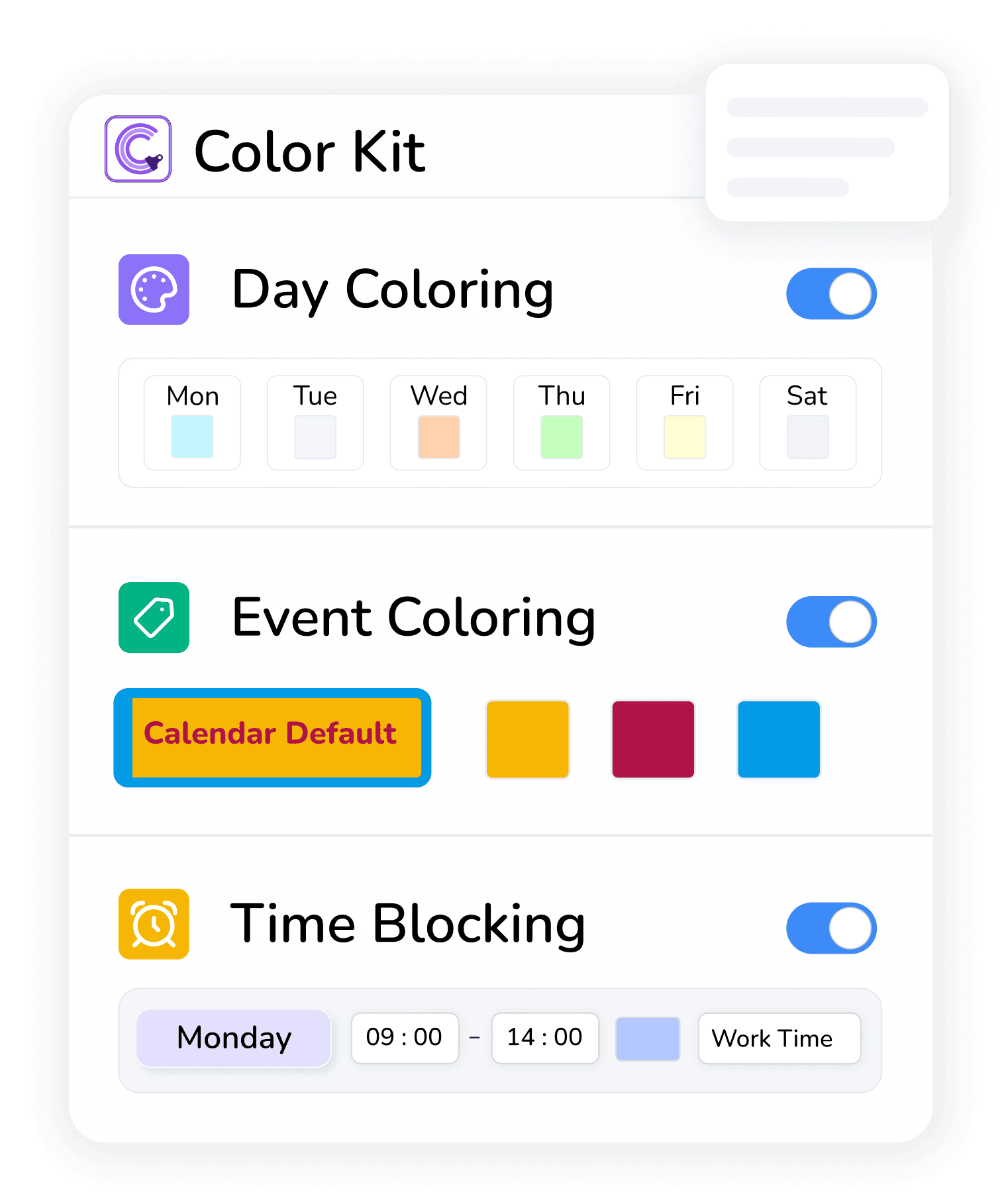
Event Colors
Event Colors
Day Colors
Day Colors
Time Blocks
Time Blocks

Visual Only - No fake events
Visual Only - No fake events

Works across Day / Week / Month
Works across Day / Week / Month
Features
Your Calendar Your Way With ColorKit
Customize Google Calendar to fit how you work and plan

Feature 1
Event Coloring
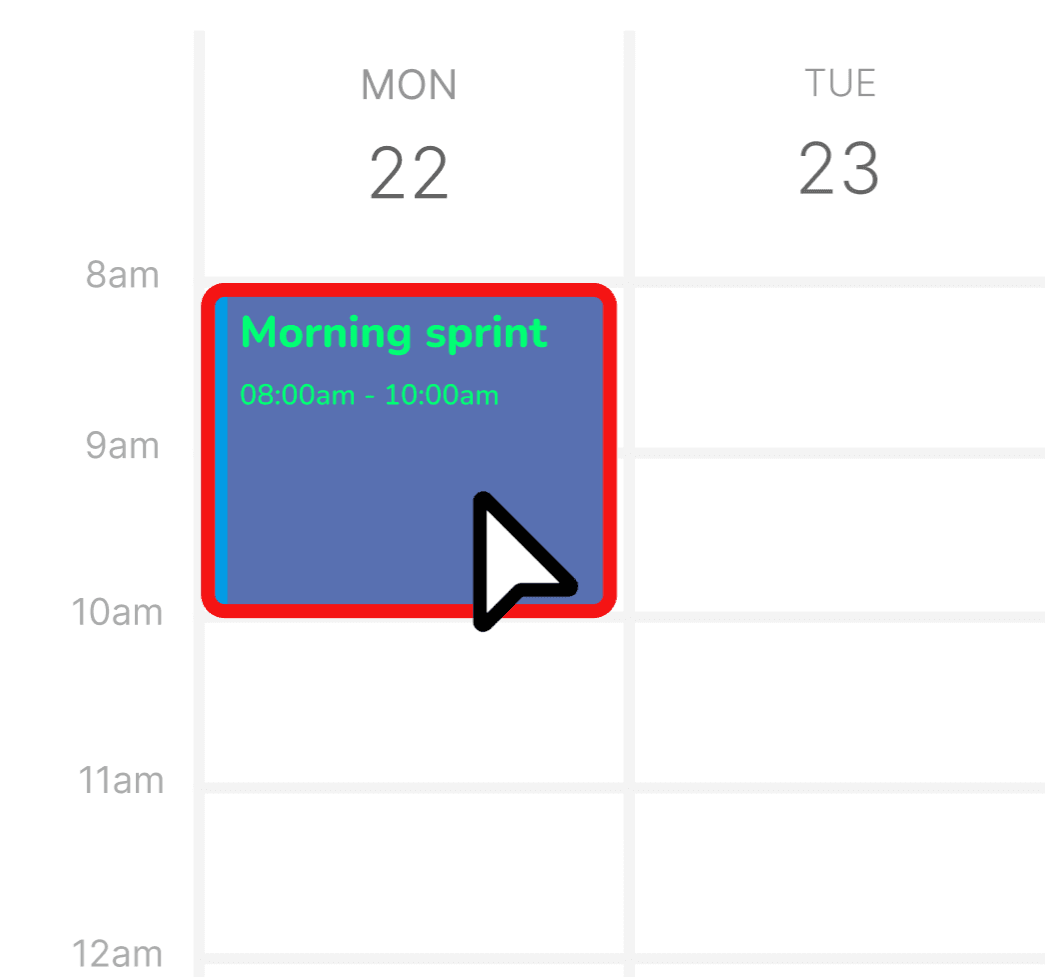
Go beyond Google's 11 default colors. Set any color you want for any event — perfect for color-coding by project, client, or priority level.
Unlimited custom colors
Automatically capture leads from social channels
Change text color for contrast
Add borders for extra visibility
Works with recurring events
Feature 2
Day Coloring
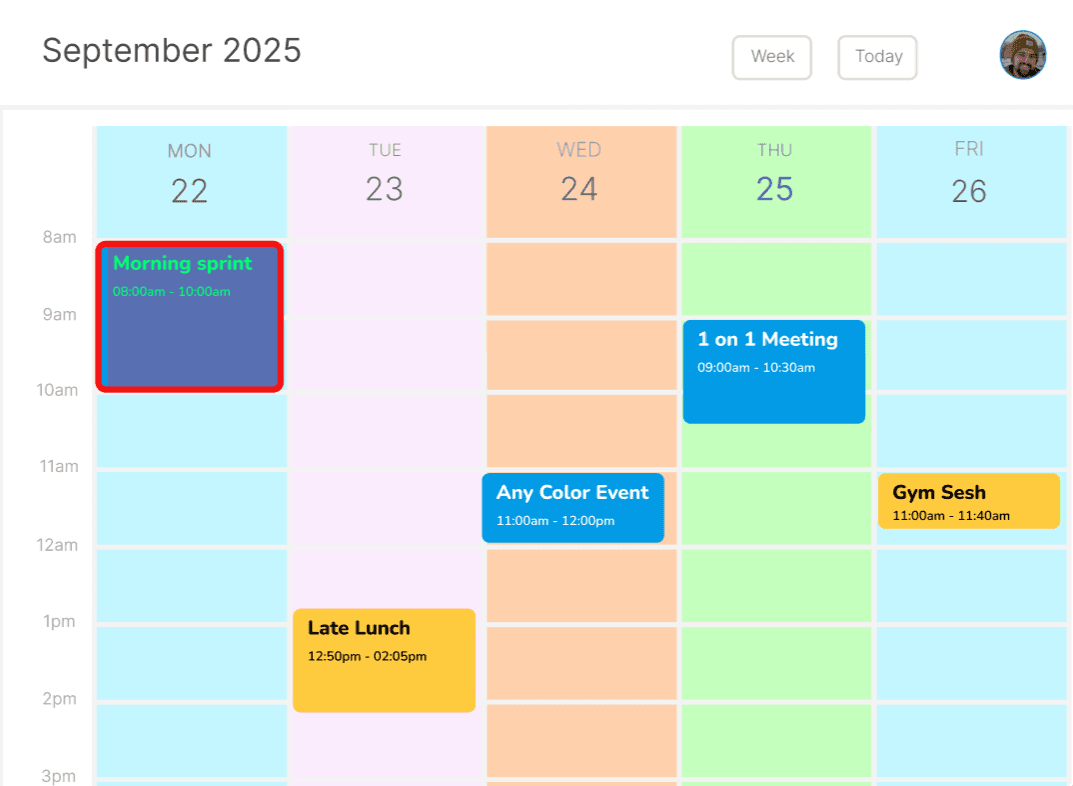
Give every day its own identity. Color-code weekdays to create visual rhythm — or highlight important dates like deadlines, birthdays, and holidays.
Set colors for each weekday
Highlight specific dates
Adjustable opacity (subtle to bold)
Highlight Weekends
Feature 3
Visual Time Blocking
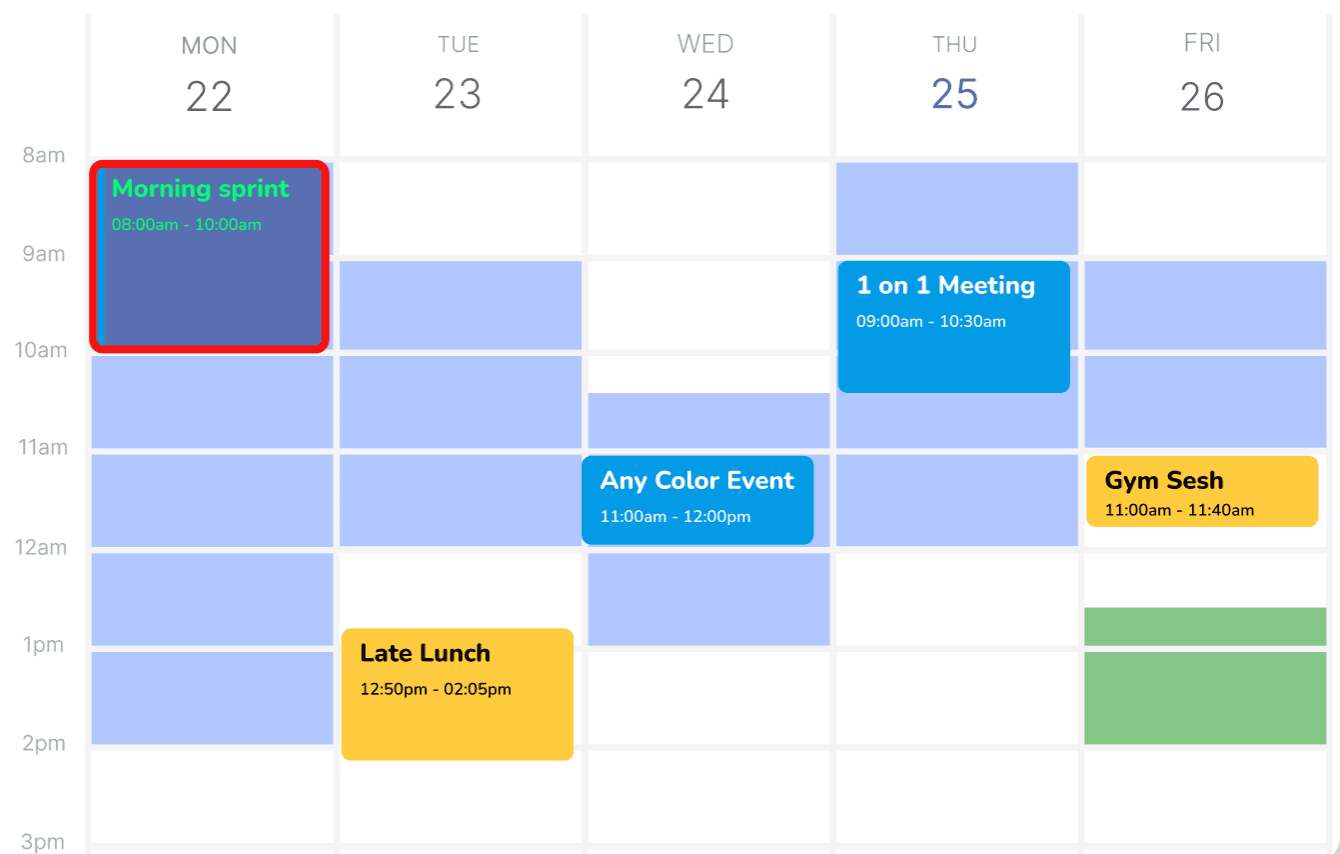
Block off focus time, lunch breaks, or "do not disturb" hours without creating fake events. Just visual shading — your calendar stays clean.
No fake events cluttering your calendar
Weekly recurring schedules
Multiple shading styles
Date-specific one-time blocks
Built for People Who Live in Their Calendar
Built for People Who Live in Their Calendar
Built for People Who Live in Their Calendar
If your calendar is your command center, ColorKit helps you see everything faster.
Remote Workers
Juggling meetings across time zones? Color-code by team, project, or urgency to instantly see what needs attention.
Freelancers & Consultants
Multiple clients, one calendar. Give each client their own color and never mix up commitments again.
Productivity Enthusiasts
Time blocking fan? Create visual focus zones without fake events cluttering your schedule.
Team Leads & Managers
Visual rhythm helps you protect focus time, see back-to-back meeting days at a glance, and plan around your energy.
Remote Workers
Juggling meetings across time zones? Color-code by team, project, or urgency to instantly see what needs attention.
Team Leads & Managers
Visual rhythm helps you protect focus time, see back-to-back meeting days at a glance, and plan around your energy.
Completely Private - No Data is Taken or Saved - We believe in transparency and data equality
No Data is Taken or Saved - We believe in transparency and data equality
Completely Private - No Data is Taken or Saved
Why ColorKit?
There are other calendar tools. Here's what makes ColorKit different.
Privacy-First
ColorKit runs entirely in your browser. Your calendar data never leaves your computer — we can't see your events, and we don't want to.
ColorKit runs entirely in your browser. Your calendar data never leaves your computer — we can't see your events, and we don't want to.
Visual Only
All changes are visual overlays. ColorKit never modifies your actual calendar data — no fake events, no syncing issues, no surprises.
All changes are visual overlays. ColorKit never modifies your actual calendar data — no fake events, no syncing issues, no surprises.
Lightweight
No performance impact. ColorKit is optimized to work silently in the background without slowing down your calendar.
No performance impact. ColorKit is optimized to work silently in the background without slowing down your calendar.
Community-Led
Built by a solo developer who uses it every day. Feature requests go straight to the roadmap — no corporate red tape.
Built by a solo developer who uses it every day. Feature requests go straight to the roadmap — no corporate red tape.
1
Advanced Coloring For Events
Advanced Coloring For Events
Set any color for your events, change the text color, or add a border. With Default Calendar Colors, every event gets their colors automatically, See your new style options be applied to all events in your calendar.
Default Coloring for Calendars
Default Coloring for Calendars
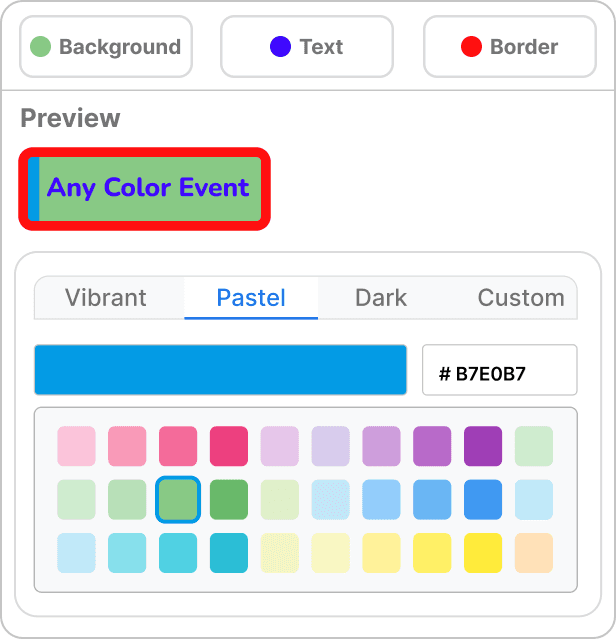
Change Any Color for Each Event

Save Colors as Templates
Text & Border Color
Any Color - Any Event
Either color events by each calendar, or change each event to fit your needs. Use red borders for important events or use text color for priority sorting.

Change Any Color for Each Event
Save Colors as Templates
Text & Border Color
Any Color - Any Event
Either color events by each calendar, or change each event to fit your needs. Use red borders for important events or use text color for priority sorting.
2
Color Code Your Days
Give Monday a mood and Friday a vibe
Shade entire day columns to visually separate busy days from lighter ones. Combined with custom event colors, your calendar becomes easier to scan, understand, and plan around in seconds.
2
Color Code Your Days
Give Monday a mood and Friday a vibe
Shade entire day columns to visually separate busy days from lighter ones. Combined with custom event colors, your calendar becomes easier to scan, understand, and plan around in seconds.
2
Color Your Days
Give Monday a mood and Friday a vibe
Shade entire day columns to visually separate busy days from lighter ones. Combined with custom event colors, your calendar becomes easier to scan, understand, and plan around in seconds.
3
Create Visual TimeBlocks
Create Visual TimeBlocks
Add visual time blocks to map out focus time, routines, or recurring schedules without creating fake events. Everything works directly inside Google Calendar’s native interface and runs entirely in your browser, keeping your data private.
1
Advanced Coloring For Events
Set any color for your events, change the text color, or add a border. With Default Calendar Colors, every event gets their colors automatically, See your new style options be applied to all events in your calendar.
Default Coloring for Calendars
Change Any Color for Each Event
Save Colors as Templates
Text & Border Color
Any Color - Any Event
Either color events by each calendar, or change each event to fit your needs. Use red borders for important events or use text color for priority sorting.
Features
Your Calendar Your Way With ColorKit
Customize Google Calendar to fit how you work and plan
Up and Running in 60 Seconds
Up and Running in 60 Seconds
No complicated setup. No account creation. Just install and start customizing.
No complicated setup. No account creation. Just install and start customizing.
1
Install the Extension
Add ColorKit to Chrome from the Web Store. One click, done.
2
Open Google Calendar
Navigate to calendar.google.com. ColorKit activates automatically.
3
Start Coloring
Click the extension icon to customize your colors, days, and time blocks.
1
Install the Extension
Add ColorKit to Chrome from the Web Store. One click, done.
2
Open Google Calendar
Navigate to calendar.google.com. ColorKit activates automatically.
3
Start Coloring
Click the extension icon to customize your colors, days, and time blocks.
Questions & Answers
Have more questions? Don't hesitate to email us:
What is ColorKit
ColorKit is a Chrome extension that adds visual customization to Google Calendar. It lets you color-code events with unlimited colors, shade entire days, and create visual time blocks — all without modifying your actual calendar data.
Do you collect or share my data?
No. ColorKit runs entirely in your browser. Your calendar data never leaves your computer, and we have zero access to your events. All color settings are stored locally on your device.
Which browsers and devices are supported?
ColorKit works on Chrome for desktop (Windows, Mac, Linux). We're focused on perfecting the Chrome experience first. Firefox and Edge support may come in the future based on community demand.
Does ColorKit work inside Google Calendar?
Yes. ColorKit works directly on top of Google Calendar’s native interface. It doesn’t create fake events or replace the calendar — it enhances what’s already there.
Can I request new features?
Absolutely! ColorKit is community-driven. Email your feature requests to adam@calendarextension.com or use the Requests page. Popular requests get prioritized on the roadmap.
Is ColorKit affiliated with Google?
No. ColorKit is an independent product built by a solo developer. It's not affiliated with, endorsed by, or connected to Google in any way. Google Calendar is a trademark of Google LLC.
Questions & Answers
Have more questions? Don't hesitate to email us:
What is ColorKit
ColorKit is a Chrome extension that adds visual customization to Google Calendar. It lets you color-code events with unlimited colors, shade entire days, and create visual time blocks — all without modifying your actual calendar data.
Do you collect or share my data?
No. ColorKit runs entirely in your browser. Your calendar data never leaves your computer, and we have zero access to your events. All color settings are stored locally on your device.
Which browsers and devices are supported?
ColorKit works on Chrome for desktop (Windows, Mac, Linux). We're focused on perfecting the Chrome experience first. Firefox and Edge support may come in the future based on community demand.
Does ColorKit work inside Google Calendar?
Yes. ColorKit works directly on top of Google Calendar’s native interface. It doesn’t create fake events or replace the calendar — it enhances what’s already there.
Can I request new features?
Absolutely! ColorKit is community-driven. Email your feature requests to adam@calendarextension.com or use the Requests page. Popular requests get prioritized on the roadmap.
Is ColorKit affiliated with Google?
No. ColorKit is an independent product built by a solo developer. It's not affiliated with, endorsed by, or connected to Google in any way. Google Calendar is a trademark of Google LLC.
Questions & Answers
Have more questions? Don't hesitate to email us:
What is ColorKit
ColorKit is a Chrome extension that adds visual customization to Google Calendar. It lets you color-code events with unlimited colors, shade entire days, and create visual time blocks — all without modifying your actual calendar data.
Do you collect or share my data?
No. ColorKit runs entirely in your browser. Your calendar data never leaves your computer, and we have zero access to your events. All color settings are stored locally on your device.
Which browsers and devices are supported?
ColorKit works on Chrome for desktop (Windows, Mac, Linux). We're focused on perfecting the Chrome experience first. Firefox and Edge support may come in the future based on community demand.
Does ColorKit work inside Google Calendar?
Yes. ColorKit works directly on top of Google Calendar’s native interface. It doesn’t create fake events or replace the calendar — it enhances what’s already there.
Can I request new features?
Absolutely! ColorKit is community-driven. Email your feature requests to adam@calendarextension.com or use the Requests page. Popular requests get prioritized on the roadmap.
Is ColorKit affiliated with Google?
No. ColorKit is an independent product built by a solo developer. It's not affiliated with, endorsed by, or connected to Google in any way. Google Calendar is a trademark of Google LLC.
Start Free
Pricing plans
Monthly
Yearly
$0
/ mo
Free Forever!
Use all the basic features completely free
Day Coloring
Time Blocking
Event Coloring
Over 30% Cheaper Yearly
$1.99
/ mo
Annually - Pro Plan
Full control over your calendar colors
All Basic Free Features
Specific Date 📅 Day Coloring
Specific Date 📅 Time Blocking
Event Coloring - Full control & Templates
Monthly
Yearly
$0
/ mo
Free Forever!
Use all the basic features completely free
Day Coloring
Time Blocking
Event Coloring
Over 30% Cheaper Yearly
$1.99
/ mo
Annually - Pro Plan
Full control over your calendar colors
All Basic Free Features
Specific Date 📅 Day Coloring
Specific Date 📅 Time Blocking
Event Coloring - Full control & Templates
Monthly
Yearly
$0
/ mo
Free Forever!
Use all the basic features completely free
Day Coloring
Time Blocking
Event Coloring
Most Popular
$2.99
/ mo
Monthly - Pro Plan
Full control over your calendar colors
All Basic Free Features
Specific Date 📅 Day Coloring
Specific Date 📅 Time Blocking
Event Coloring - Full control & Templates


Subscribe to Our Newsletter!
Get updates on our new extensions and tools before anyone else with discounts delivered straight to your inbox.



Adam
Adam
Adam
Meet The Team
Hey 👋 I'm Adam
Hey 👋 I'm Adam
I built this extension for myself — I’m not a big organization or Google, just a solo-developer trying to make useful apps that help people.
After using it for a year and seeing others on Reddit share the same frustrations, I decided to take a risk and turn it into a real product others can try.
Since this is my first personal project released publicly, I’m invested in feedback and improvements. I welcome any suggestions that help make it better for everyone. Hope it helps you.
I built this extension for myself — I’m not a big organization or Google, just a solo-developer trying to make useful apps that help people.
After using it for a year and seeing others on Reddit share the same frustrations, I decided to take a risk and turn it into a real product others can try.
Since this is my first personal project released publicly, I’m invested in feedback and improvements. I welcome any suggestions that help make it better for everyone. Hope it helps you.